Instructions for installing extensions
Nevigen Installer is used to install and update Nevigen.com software products.
It integrates with the standard Joomla extension manager and allows you to browse available products, check system requirements, install extensions, and manage updates directly from the website administration area.
1. Installing Nevigen Installer
Sign in to Nevigen.com, open your user account, and download the latest version of Nevigen Installer.
Install the downloaded package using the standard Joomla extension installer.

After Nevigen Installer has been installed, an additional “Install from Nevigen.com” tab will appear in the standard Joomla extension manager.
2. Nevigen Installer Features
The “Install from Nevigen.com” section provides:
- extension search by name;
- product filtering by category;
- display of free products only;
- the ability to hide already installed extensions;
- system requirements checks for individual products;
- installation of available products directly from Joomla;
- updates for installed software products.
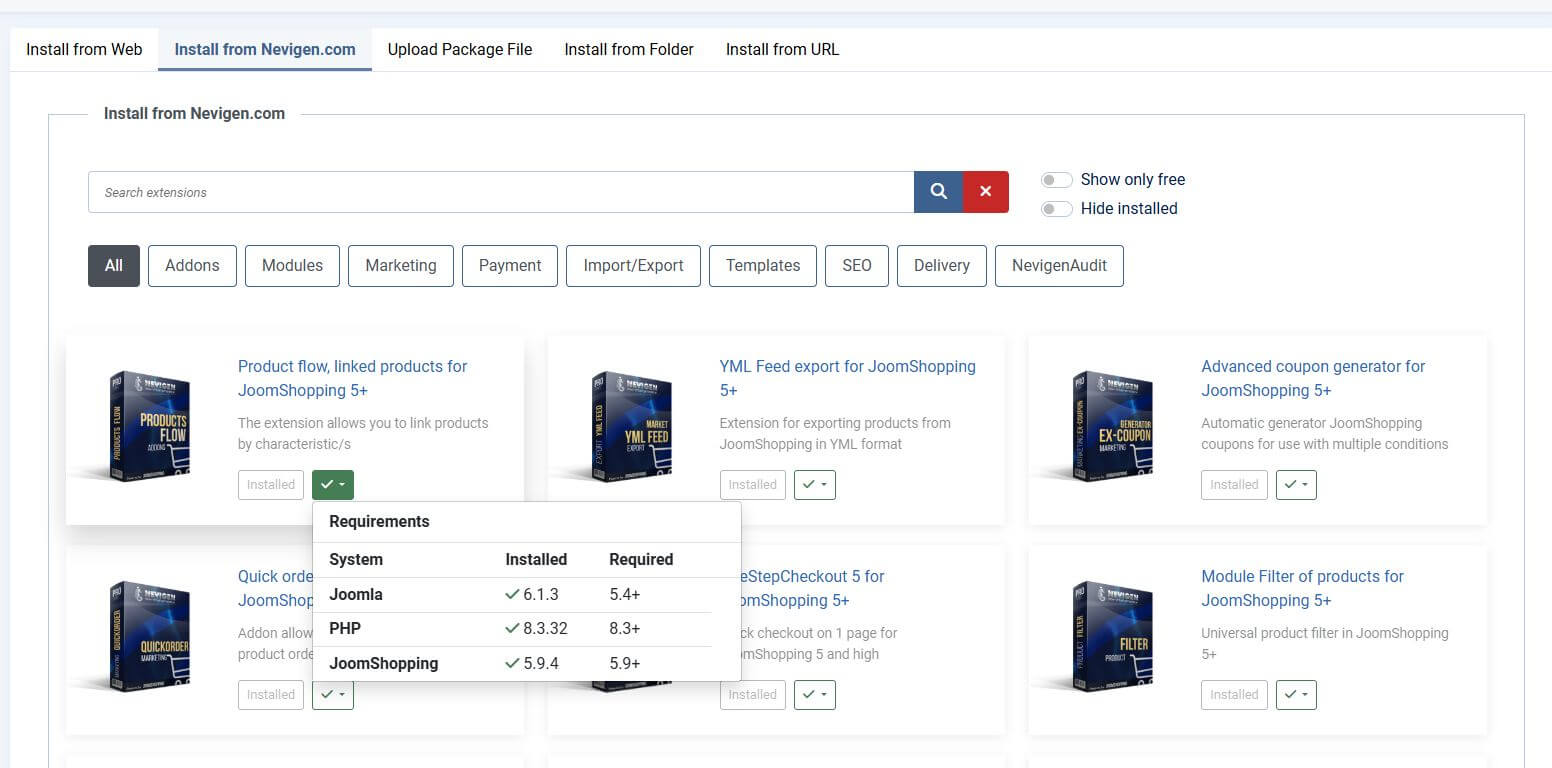
3. Checking System Requirements
Before installing or updating a product, Nevigen Installer can automatically check whether the current website environment meets the system requirements of the relevant extension.
Depending on the product, the check may include:
- Joomla version;
- PHP version;
- JoomShopping version, where required by the product;
- other required components or dependencies.
The Requirements section shows the currently installed version or status of a component and the requirement defined for the relevant product.
If a requirement is satisfied, Nevigen Installer displays a successful check result.
If the website does not meet one or more requirements, we recommend resolving the identified incompatibilities before installing or updating the product.
4. License Key and Product Installation
A Nevigen.com License Key is used to access purchased software products.
The License Key is available in the user account after purchasing a software product for the relevant domain name.
After installing Nevigen Installer, enter the received License Key in its settings.
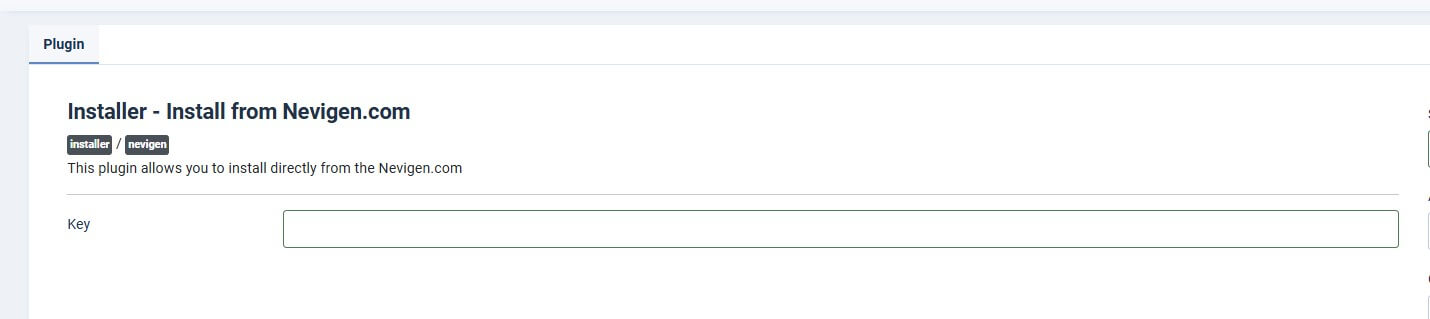
After the License has been validated, Nevigen Installer determines which software products are available for the current website.
To install an extension:
- open the “Install from Nevigen.com” tab;
- find the required product;
- check its system requirements;
- click the install button;
- wait for the standard Joomla installation process to complete.
A License is valid only for the specific full domain name specified when it was issued and does not automatically extend to subdomains or other domain names.
Detailed License rules are defined in the License Agreement.
5. Updating Extensions
Nevigen.com software products support the standard Joomla extension update mechanism and may be updated in the same way as other installed extensions.
However, for Nevigen.com products we recommend performing updates through Nevigen Installer.
Before updating through Nevigen Installer, you can obtain additional product information and check whether the current website environment meets the requirements of the new version.
In particular, Nevigen Installer may show:
- whether the available update can be installed;
- the system requirements of the new version;
- the current Joomla, PHP, JoomShopping, and other dependency versions;
- incompatibilities that may prevent a successful update.
When updating through the standard Joomla extension manager, an incompatibility or another issue may result only in a general error message.
Nevigen Installer provides more detailed information about the current website environment and product requirements, making it easier to identify a potential problem before the update is performed.
To receive new versions of a paid product, the relevant License must provide active access to updates.
After update access expires, the already installed version of the product may continue to be used on the Licensed Domain unless otherwise expressly stated in the terms of the specific product.
Before installing any update, we recommend creating an up-to-date backup of the website and database.
6. Free Products and Local Installations
Nevigen Installer also allows users to browse and install available free Nevigen.com products.
The “Show only free” filter can be used to display free products only.
Support and update terms for free products may differ from those applicable to paid products and are defined on the relevant product page.
Installation of software products through Nevigen Installer on a local server is not supported.
Nevigen Installer works with a License associated with a specific domain name.
A License for one domain name does not grant the right to use the same License Key on another domain, subdomain, test domain, or temporary address.
7. Installation Security
We recommend obtaining Nevigen Installer, Nevigen.com software products, and their updates exclusively through Nevigen.com or through installation and update mechanisms provided by our products.
Nevigen.com cannot guarantee the integrity, current status, or security of software product copies obtained from third-party websites, file repositories, or other unofficial sources.
Such copies may be outdated, modified, or contain third-party code that is not present in the official version of the product.
8. If You Encounter a Problem
If an extension cannot be installed or updated, first review the information provided by Nevigen Installer.
- system requirement check results;
- License status for the current domain;
- versions of the required software environment;
- messages about identified incompatibilities;
- Joomla installation or update error messages.
If you cannot identify the cause yourself, contact Nevigen.com technical support.
When contacting support, please provide where possible:
- the name of the software product;
- the Licensed Domain name;
- the Joomla version;
- the JoomShopping version, if used by the product;
- the PHP version;
- a description of the issue;
- the error message text or a screenshot of the error.
Technical support, update, and software usage rules are defined in the License Agreement.